
Pointer Fishing
A downloadable game for Windows
Pointer Fishing
Turn your desktop into an ocean to fish from! Fish will spawn anywhere on a selected monitor. Grab them with your mouse and reel them in by dragging them into your net. But they wont go easily, they'll drag your mouse as they try to run. Fight to keep them within your net long enough to catch them!
Fish Fish Fish Fish Fish
Fish can be found with 9 different Mutations and 8 Behaviors, giving tons of variants to collect. With 200 Fish across 9 Locations and 6 Rarities, there are 14,400 unique variants to find!
Bounties
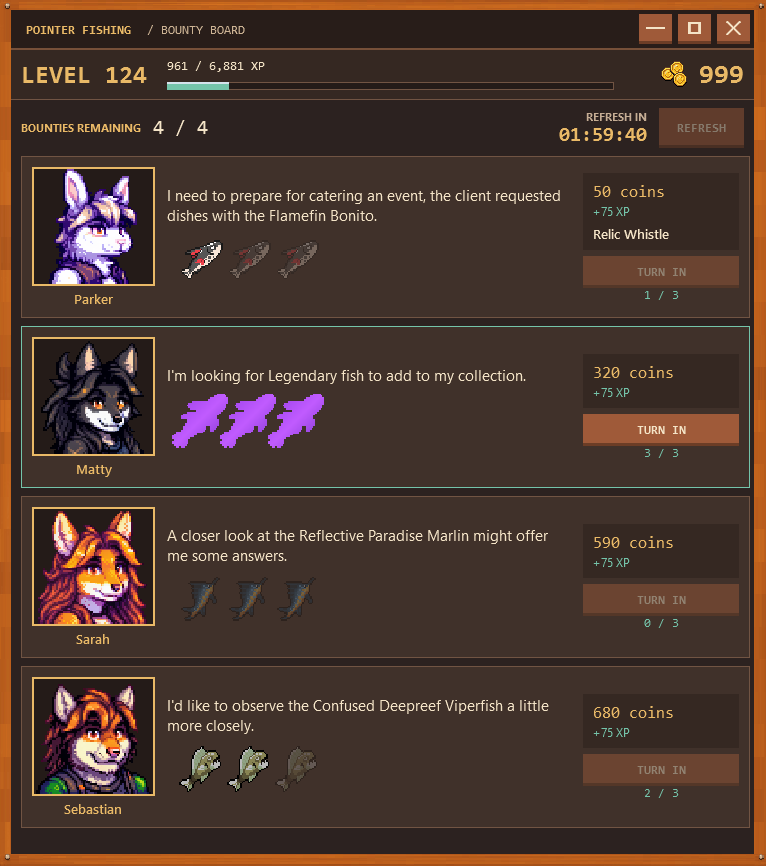
Friendly faces will ask for help finding fish. Each character gives 1 bounty per refresh, for a total of 4. Completing all of them refreshes the Bounty Board early, or you can refresh it manually after 2 hours.
Bounties ask for particular species, rarities, mutations, behaviors, or weights. They pay more than the fish would normally be worth or reward gear and aquarium items.
Completing an NPC's bounty gives them xp too. When they level up they offer harder Bounties with higher rewards.
Gear
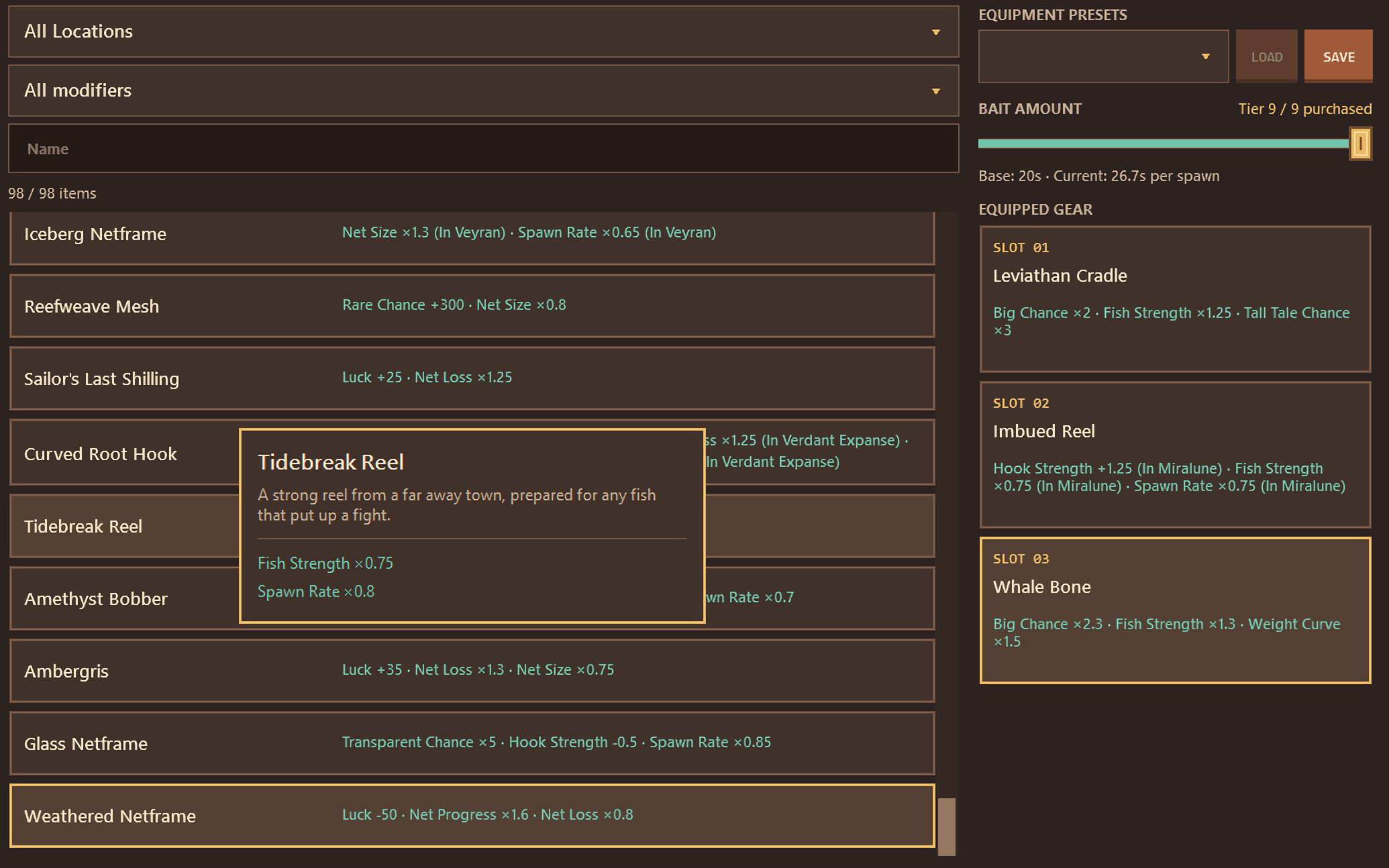
Gear can be bought from the shop, found while fishing, and be rewarded by completing bounties. Mix equipment to target specific fish or to combat rough waters and strong fish. There are 110 unique gear, but only two equipment slots to start, with a third available after level 100.
Catch Modifiers
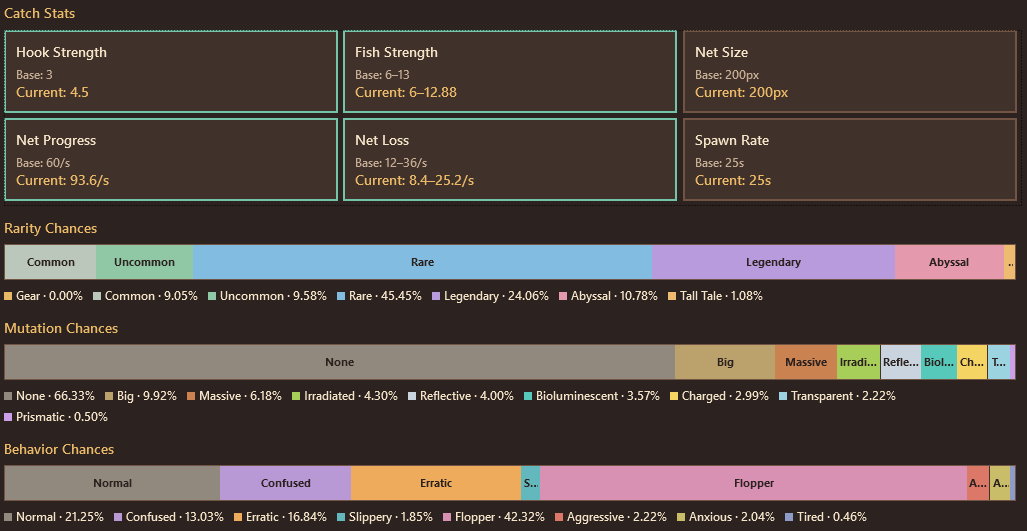
Many different systems add modifiers to your catches. These adjust your chances to find fish and how hard it is to catch them.
Gear, Drinks, Ocean Conditions, and Catch Combos can contribute to your current stats. To help you keep track, the modifiers tab shows your stats and whats affecting them.
Cat Café
Drinks from the local cat café offer boosts for various stats. The Lucky Cocktail and Coffee are always available, while 2 Daily Drinks swap out every day offering different boosts. In total, there are 27 different drinks to help you on your next catch.
Note: This game has no online functionality, the daily drink is picked using the current system date deterministically.
Ocean Conditions
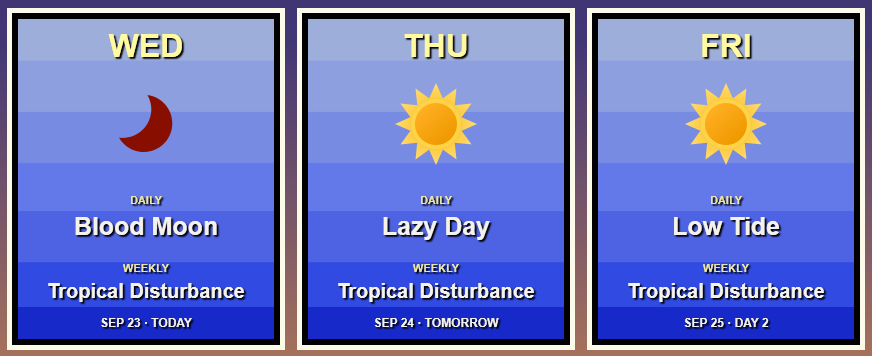
Daily and weekly ocean conditions add modifiers that affect your catches in positive and negative ways.
There are 26 daily and 14 weekly ocean conditions. They add modifiers that last all day and all week, afecting your chances and difficulty. Switch up your gear to adapt to the conditions. The weather forecast gives you a preview of the conditions for up to the next week to help you plan your fishing trips.
Note: This game has no online functionality, ocean conditions are picked using the current system date deterministically.
Desktop Aquarium
Place an aquarium window anywhere on screen, or make it full screen to let your fish roam across your whole monitor. Change up the floor and background, or make it transparent to see fish swim around on top of your app windows. Find decorative items to place in the aquarium while fishing and completing quests. Fish swim around depending on their behavior: floppers bounce off other fish, erratic fish boost around, aggressive fish charge at your mouse when you tap on the window, etc.
Extras
Ripple Shader
An optional feature that adds a water rippling effect across your whole screen. The water ripples as you move your cursor. It's a heavier affect, so it's not enabled by default. Additionally, it's hard to show off as to create the affect, it has to exclude the ripple shader from the system's capture, so screen sharing and screen recording won't be able to see it. It can be toggled anytime in the settings menu.
Discord RPC
Enabled by default, this feature connects to your locally running Discord client to show your current fishing location and, if separately enabled, whether you are in the middle of catching a fish.
Stats
The stats window keeps track of your catch history, play time, and other statistics. It also shows any awarded achievements.
Particles
The game uses various particle effects to show fish spawning and indicate if a fish is affecting your catch with it's behavior. These can be tuned to have more or less particles, or turned off entirely in the settings menu.
Save Export/Import
Pointer Fishing has no cloud saves or account system. To help you move across devices and backup your saves, the settings menu has an easy way to export and import your save data. Exporting creates a single file that contains all your progress and settings.
Requirements
| Minimum | Recommended | |
| OS | Windows 10 22H2, 64-bit1 | Windows 11, 64-bit |
| Processor | Dual-core Intel/AMD processor ~2GHz | Modern quad-core Intel/AMD processor |
| Memory | 4GB | 8GB |
| Graphics | DirectX 9 and Shader Model 2.0 compatible integrated graphics2 | DirectX 11 and Shader Model 3.0 compatible integrated or dedicated graphics |
| Display Resolution | 1280x720 at 100% scaling | 1920x1080+ |
| Storage | 300 MB available | 1 GB available |
| Input | Mouse | Mouse + Keyboard |
| Internet3 | None | Optional |
1: The optional Ripple Effect requires Windows 11.
2: The optional Ripple Effect requires DirectX 11 and Shader Model 3.0.
3: Pointer Fishing does not require an internet connection to play. Internet is only required for downloading the game, sending bug reports, and using Discord Rich Presence.
Attribution
I would not have been able to complete this project without the work of these great artists!
- ToffeeCraft - Medieval UI Pack (Modified)
- happypotato100 - Fishing Icon Pack (Modified)
- PixelOdyssey - 100 Fish Icons (Modified)
- Beowulf - Fish Asset Pack (Modified)
- Makin-Things - Weather Icons (Modified)
- brysiaa - Fishtank
- cccretina - Pixel Art Bartender
- kelvira - Currency Icons
- gdainti - Retro Computer Icons (Modified)
- ghostpixxells - Pixel Mart (Modified)
- Dusk Games - UI Icons
- HONEY DOT - Magic Book Icons (Modified)
- InKing - Furry Portraits
- Nakufin - Epsi's Portrait
Privacy Policy
Pointer Fishing Privacy Policy
Effective October 11, 2026
Pointer Fishing is made by Epsi (https://www.epsirho.com). This policy describes the information the game uses and your choices.
Local progress and settings:
The game saves your level, coins, inventory, equipment, aquarium, bounties, achievements, discovered fish/combos/conditions/drinks, play time, catch history, and settings on your computer. Saves are stored under %APPDATA%\ARI\PointerFishing. Recovery checkpoints and backups are stored there too. These files are not automatically uploaded or synced by the game. Your operating system or backup software may separately back them up.
Statistics and input:
Catch statistics and play time are used for the game's Stats window and achievements. Mouse position and cursor movement are used for fishing gameplay. The game does not record keystrokes, maintain a browsing history, or send mouse movements to the developer.
Diagnostics:
Diagnostic logs may contain error messages, technical details, and file paths supplied by Windows or exceptions. Logs are stored under %APPDATA%\ARI\PointerFishing\Logs. The game retains the current log and one rotated previous log. Logs are not sent automatically.
Discord Rich Presence:
If enabled in Settings, the game connects to your locally running Discord client to display activity such as your current fishing location and, if separately enabled, whether you are catching a fish and its rarity. Discord receives and handles that activity under its own privacy policy (https://discord.com/privacy). Disable Discord Rich Presence to stop this connection. The developer does not receive your Discord account information from the game.
Ripple Shader:
When the ripple effect is enabled, Windows DGXI Desktop Duplication API copies pixels from the selected display into local memory/graphics resources to render the effect. This can include other applications visible on that display. The game does not record those images to disk or transmit them. Capture stops when the effect is disabled. Always On keeps the effect running between catches. To support the effect, the Ripple Shader Rendering surface is hidden from the system's capture to avoid recursive capturing, meaning screen share and screen recording wont be able to see the ripple shader. Disable Ripple Shader to avoid this desktop capture.
Optional bug reports and external links:
The game has no automatic analytics, advertising, or developer telemetry. If you choose Send Report, the Issue Summary and Steps to Reproduce you enter are sent through HTTPS to the developer's Google Form. System information is included only if you check its option, you can preview the exact text before sending. It contains the game version, Windows/runtime information, rendering tier, and monitor details. Saves, logs, screenshots, account identifiers, and usernames are not automatically attached. Please avoid entering personal or sensitive information you do not want to share. Google processes submissions and associated connection metadata, such as IP address, under its privacy policy (https://policies.google.com/privacy). The developer uses reports to investigate and resolve issues and retains them while needed for support and development.
Opening any attribution or support link launches your browser, each site has its own privacy practices.
Your choices and deletion:
You can disable Discord and Ripple Shader, omit system information, or choose not to submit a report. Export and Import let you manage a local save archive. Reset Save Data starts a new profile but deliberately retains a recovery backup. To permanently remove local progress, backups, and logs, close the game and delete the folders listed above and any exported archives you kept. Uninstalling may leave these user files in place.
Contact and requests:
For privacy questions, corrections, or deletion requests concerning a submitted report, contact Epsi through epsirho@epsirho.com. Include enough report details to locate it, the game does not create an account or unique reporting identifier for you.
Updates:
Changes to this policy will be included in game updates with a revised effective date.
Purchase
In order to download this game you must purchase it at or above the minimum price of $3.99 USD. You will get access to the following files:

Leave a comment
Log in with itch.io to leave a comment.